You have a stack of lecture notes scrawled across notebook pages, a printed textbook chapter covered in highlights, or a whiteboard photograph from a workshop. The information trapped in those analog formats is valuable, but manually retyping it to create study materials feels like a waste of time you do not have. This is exactly the problem that OCR—Optical Character Recognition—was built to solve.
OCR technology has matured enormously over the past decade. Early OCR systems were clunky, error-prone, and limited to perfectly printed text. Modern OCR, powered by deep learning neural networks, can handle messy handwriting, photographed documents, whiteboards with marker text, and even text embedded in complex diagrams. When paired with AI quiz generation, it creates a pipeline that goes from paper to interactive assessment without requiring you to type a single word.
What Is OCR and How Does It Work?
Optical Character Recognition is the process of converting images of text—whether scanned, photographed, or otherwise digitized—into machine-readable text that computers can process, edit, and search. If you have ever scanned a paper document and been able to copy-paste text from the resulting file, you have used OCR without realizing it.
Modern OCR operates in several stages. First, the system preprocesses the image, adjusting contrast, correcting skew, and removing noise like shadows or creases. Then it segments the image into individual characters or words. A recognition engine—typically a deep neural network trained on millions of text samples—identifies each character and assembles them into words and sentences. Finally, post-processing uses language models to correct errors by considering context, much like how your phone's autocorrect works.
The accuracy of modern OCR on printed text routinely exceeds 99 percent. Handwriting recognition is more challenging because of the enormous variation in how individuals form letters, but current systems still achieve 85 to 95 percent accuracy on reasonably legible handwriting—more than sufficient for educational purposes when combined with human review.
The Educational Use Case: Why This Matters for Teachers and Students
Teachers accumulate enormous amounts of analog material over their careers: lesson plans written on paper, diagrams drawn on whiteboards, student worksheets, printed textbook excerpts annotated with margin notes. All of this represents valuable educational content, but in paper form, it cannot be searched, shared digitally, or used to generate assessments.
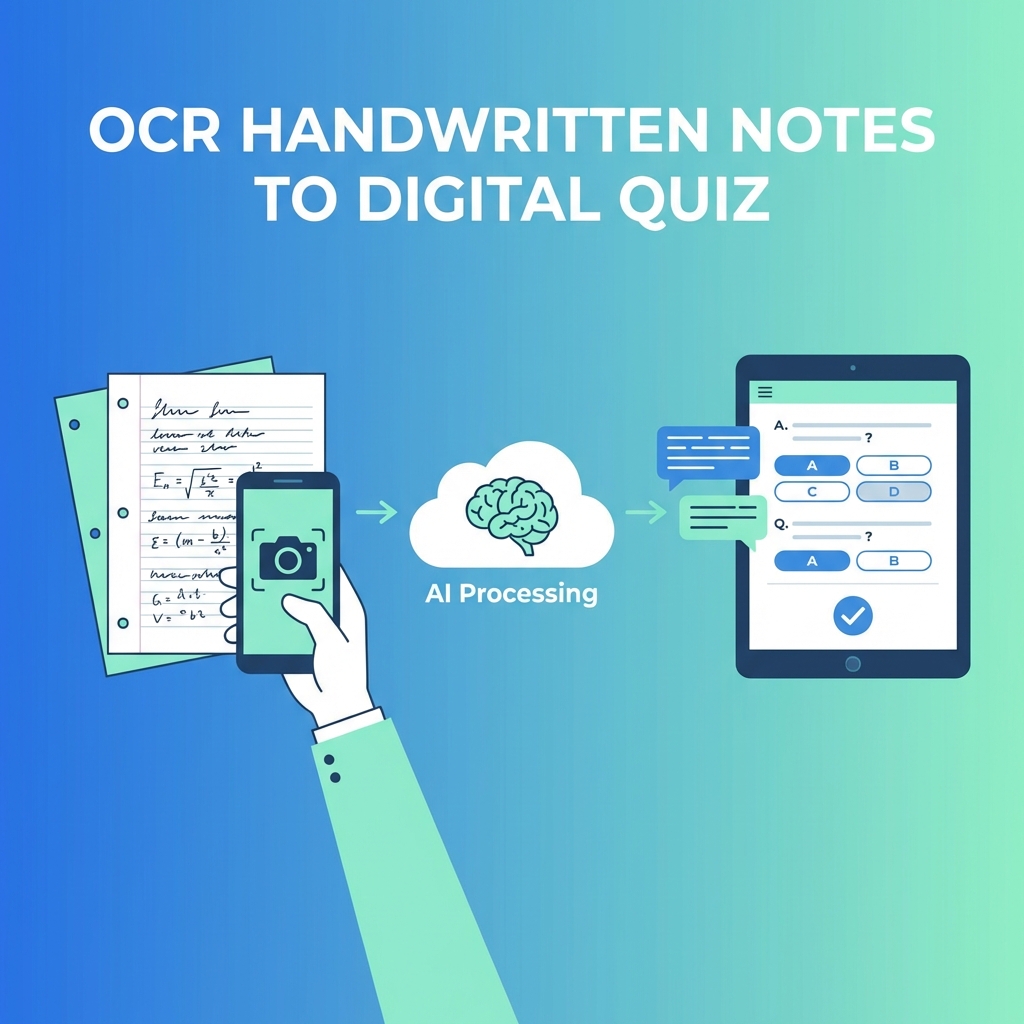
OCR bridges this gap. A teacher can photograph the whiteboard at the end of a lesson, run the image through an OCR-enabled quiz generator, and have a set of review questions ready before the next class. A student can snap a picture of their handwritten study notes and generate practice quizzes for self-testing—a study technique proven to be far more effective than passive re-reading.
This workflow is particularly powerful because it removes the transcription bottleneck. The limiting factor in turning analog content into digital assessments has always been the manual effort of retyping. OCR eliminates that step, making the entire process fast enough to be done routinely rather than reserved for special occasions.
Step-by-Step: Turning a Photo of Notes into a Quiz
The process is straightforward, even for someone who has never used OCR before. Here is how it works from start to finish:
- Capture the image — Take a clear photo of your handwritten notes, textbook page, or whiteboard. Use good lighting and try to keep the camera parallel to the surface to minimize distortion. Most smartphone cameras produce sufficiently high-resolution images.
- Upload to an OCR-enabled platform — Tools like AdvanceQuiz accept image uploads directly. The platform processes the image and extracts readable text using its OCR engine. You can review the extracted text to correct any recognition errors.
- Review extracted text — Check the OCR output for accuracy, especially with handwritten content. You may need to fix a few misread characters, particularly ambiguous letters like 'a' versus 'o' or numbers like '1' versus 'l'.
- Generate quiz questions — Once the text is clean, the AI analyzes the content and generates quiz questions based on the key concepts, definitions, and facts it identifies. You choose the question types, number of questions, and difficulty level.
- Review and publish — Check the generated questions, make any adjustments, and your quiz is ready to share with students or use for self-study.
Tips for Getting the Best OCR Results
While modern OCR is remarkably robust, a few simple practices significantly improve accuracy and save you time on manual corrections:
- Lighting matters more than camera quality — Even lighting without harsh shadows produces dramatically better results than a high-resolution image taken under uneven lighting.
- Flatten the page — If scanning from a book, press it flat. Curved text near the spine is one of the most common sources of recognition errors.
- Write legibly when possible — If you know you will be scanning your notes later, making your handwriting slightly more deliberate pays off in OCR accuracy.
- Use dark ink on light paper — High contrast between text and background is the single most important factor for OCR accuracy.
- Avoid photographing at an angle — Shoot straight-on so the text lines are horizontal in the image. Many OCR engines can correct moderate skew, but straight images always produce better results.
- Clean up the image first — Crop out irrelevant elements like desk surfaces, coffee cups, and other objects that might confuse the OCR engine.
Beyond Notes: Other Sources You Can Digitize
Once you start using OCR for notes, you quickly realize it applies to far more than handwriting. Printed worksheets from years past can be scanned and converted into interactive digital versions. Textbook pages—even from editions that do not have digital versions—become fair game for quiz generation. Conference handouts, journal articles, and training manuals join the list.
Some creative applications include photographing posters and displays during museum visits to create educational quizzes afterward, scanning historical documents for history class assessments, and converting lab procedure printouts into safety knowledge checks. Event any slide deck printed on paper can be photographed and turned into a review quiz.
Privacy and Data Considerations
Whenever you digitize documents, it is worth thinking about what you are uploading and where it goes. Any platform you use for OCR and quiz generation should have clear data handling policies. Look for services that do not store your uploaded images permanently, encrypt data in transit and at rest, and comply with educational privacy regulations like FERPA.
This is especially important if you are scanning student work or documents containing personally identifiable information. Choose platforms with transparent privacy practices and, when scanning student materials, obtain appropriate permissions.
The Technology Behind the Magic
The rapid improvement in OCR accuracy is largely due to convolutional neural networks (CNNs) and transformer models—the same technology that powers modern language models. These systems learn to recognize characters not through hard-coded rules but by training on millions of examples of text in different fonts, sizes, handwriting styles, and conditions.
What makes current OCR special is its ability to handle context. A standalone letter might be ambiguous—was that an 'a' or an 'o'? But when the surrounding letters spell 'photosynthesis,' the model uses its language understanding to resolve the ambiguity correctly. This context-aware recognition is why modern OCR handles imperfect input so much better than older systems.
The combination of OCR and AI quiz generation represents a genuine shift in how educators can repurpose existing content. Material that would have taken hours to digitize and restructure can now be transformed in minutes.
— Dr. Lisa Park, Educational Technology Researcher
Looking Ahead: Where OCR Is Going
OCR technology continues to advance rapidly. Emerging capabilities include real-time OCR that processes text as you write, recognition of mathematical equations and scientific notation with high fidelity, multilingual OCR that handles documents mixing multiple languages, and handwriting style adaptation that improves accuracy the more it sees a specific person's writing.
For education, these developments mean that the barrier between analog and digital content will continue to shrink. The goal is not to eliminate handwriting—there are well-documented cognitive benefits to writing by hand—but to ensure that the valuable content created through handwriting does not remain trapped on paper when it could be serving students in interactive digital formats.
Getting Started Today
You do not need to be technically savvy to start converting your analog materials into digital quizzes. Take a photo of one page of notes, upload it to an OCR-enabled platform like AdvanceQuiz, and see the results for yourself. Most people are genuinely surprised by how accurate and fast the process has become. Once you experience the workflow, you will find yourself reaching for your phone camera every time you encounter content worth quizzing.
The transition from paper to interactive digital assessment does not have to be a massive project. Start with one set of notes, one chapter, or one lecture. As you build confidence in the process, it naturally becomes part of your regular workflow—turning what was once a stack of static paper into a dynamic learning tool your students can use anywhere, anytime.
Ready to Transform Your Quiz Creation?
Join thousands of educators using AI to create engaging assessments in seconds.
Get Started Free